Batch Data Matching API: Match and Deduplicate Entire Files with SmartMatchAI
Data matching is one of the most important steps in turning fragmented business data into a more useful operational asset. Customer lists, vendor files, CRM exports, account tables, marketing datasets, and partner-supplied records often contain the same real-world entities in different forms.
A company may appear as General Electric, Gen Electric Corp, and GENERAL ELECTRIC COMPANY. A person's name may include initials, nicknames, abbreviations, or formatting differences. Addresses may vary by spelling, unit numbers, punctuation, or regional conventions.
The Interzoid Batch Data Matching API is designed to solve this problem at file scale. Instead of calling a matching API one record at a time, the API processes an entire CSV or TSV file in a single request, assigns AI-powered similarity keys to each record, and returns matched clusters that identify records likely to represent the same company, person, address, or combined entity.
Why Batch Data Matching Matters
Data is often duplicated, inconsistent, and difficult to connect across systems. This creates downstream friction across sales, marketing, operations, analytics, compliance, and AI initiatives.
When duplicate or inconsistent records remain unresolved, organizations can experience multiple versions of the same customer, vendor, supplier, or account; inaccurate reporting and segmentation; poor CRM and marketing automation performance; manual cleanup work for data and operations teams; and lower confidence in analytics, dashboards, and AI workflows.
The Batch Data Matching API helps address these issues by applying Interzoid's matching intelligence across an entire file at once. Records that resolve to the same real-world entity receive the same similarity key, making it easier to group, deduplicate, merge, review, or link them.
How the Batch Matching API Works
The API processes a CSV or TSV file that is accessible in the cloud as raw text, such as a file hosted in AWS S3, and applies a selected matching function to one or more columns. For each row, Interzoid generates an AI-powered similarity key based on the field or fields being matched. Records that share the same similarity key are returned together as match clusters.
Provide a Cloud File
Provide the URL of a CSV or TSV file that is accessible in the cloud as raw text, such as a file hosted in AWS S3.
Choose a Function
Select company, full name, address, or a multi-field match function.
Generate SimKeys
SmartMatchAI assigns similarity keys to records across the file.
Review Clusters
Records sharing the same key are grouped as candidate matches.
The output can be used to identify duplicate records, consolidate files, support review workflows, create merge candidates, or link related records across datasets.
Why Programmatic API Access Expands the Value
Because the Batch Data Matching capability is available programmatically as an API, it can be embedded directly into the systems and processes where data quality problems actually appear. This makes matching more than a one-time cleanup task. It becomes part of an operational data workflow.
Developers, data engineers, and automation teams can use the Batch Data Matching API inside application workflows, backend services, scheduled jobs, data pipelines, onboarding processes, CRM imports, partner-file processing, analytics preparation, and agent-driven processes. Instead of exporting files, manually reviewing them, and re-importing results, matching can occur automatically at the point where the data enters or moves through the business.
- Workflow automation: match uploaded files before they enter CRM, ERP, marketing, or operational systems.
- Data pipelines: add similarity keys as a repeatable step in ETL, ELT, warehouse, or lakehouse processes.
- Agent processes: allow AI agents and automated systems to inspect, prepare, deduplicate, or link datasets before taking action.
- Application integration: embed file-based matching directly inside SaaS platforms, internal tools, portals, and data products.
- Recurring cleanup: run matching whenever new customer, supplier, account, contact, or partner files are received.
This API-first model helps organizations operationalize data quality. It also reduces the need to build and maintain custom fuzzy matching logic inside every application, script, or data pipeline.
Six Matching Functions in One Batch Workflow
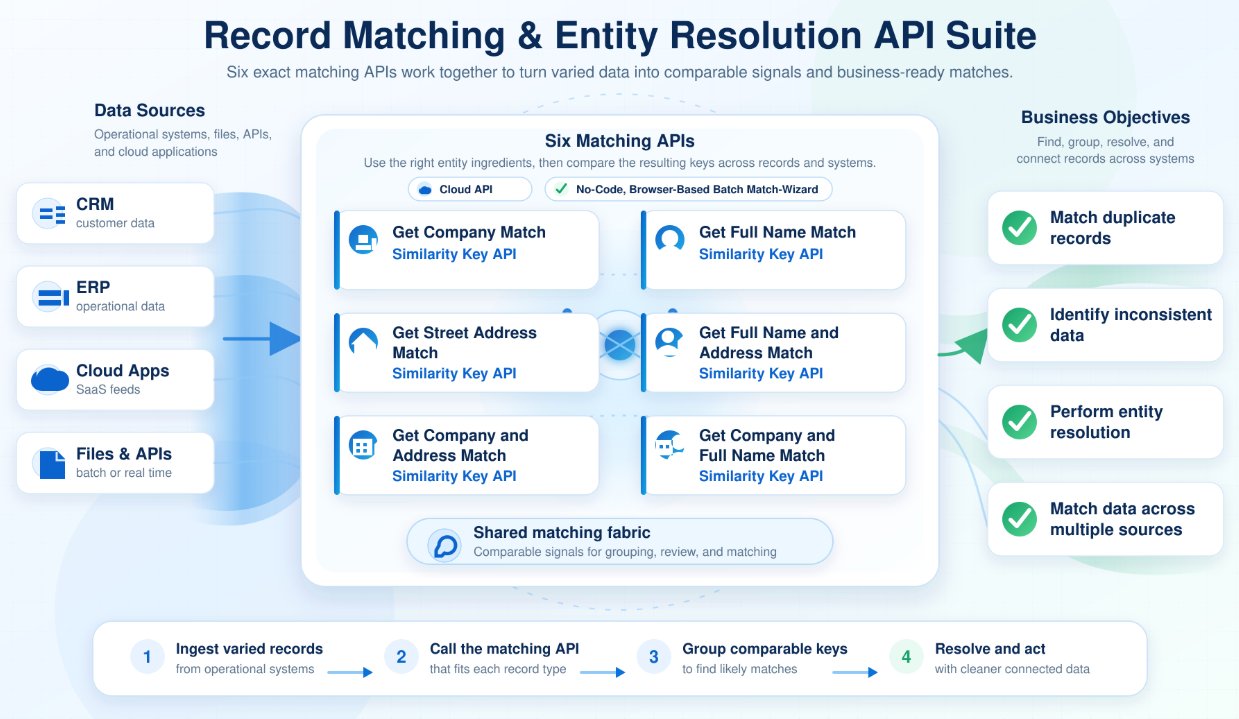
The Batch Data Matching API brings together six core Interzoid matching capabilities, each of which is also available as its own individual API product.
Company Name Matching
Match and deduplicate records by company or organization name, including common variations, abbreviations, acronyms, spelling differences, and formatting inconsistencies.
Individual Name Matching
Identify similar or duplicate personal names across contact lists, customer records, registration files, or other datasets involving individuals.
Street Address Matching
Match records by street address, helping identify duplicate or inconsistent location records despite formatting differences, abbreviations, or variations in address structure.
Company and Address Matching
Match records using both organization name and address. This helps improve precision when matching business entities across customer, vendor, supplier, or account datasets.
Company and Full Name Matching
Match records using both company name and individual name, useful for contact records, account relationships, CRM cleanup, and sales or marketing datasets.
Address and Full Name Matching
Match records using both address and personal name, helping identify duplicate individuals or households where address and name together provide stronger matching context.
Together, these functions make the Batch Data Matching API flexible enough to support many common data quality, deduplication, entity resolution, and record linkage use cases.
No-Code Matching with the Match Wizard
Not every matching project needs to start with code. The same matching engine is also available through the browser-based Interzoid Match Wizard.
The Match Wizard showcases the Batch Matching API in a no-code manner, allowing users to upload local CSV or TSV files within the browser, map columns, choose a match type, and generate matched results without writing software.
This is useful for business users, analysts, operations teams, and data teams that want to test results quickly on real files before deciding how to operationalize the workflow programmatically.
Launch the Interzoid Match Wizard
Use Cases Across the Business
Batch matching can support a wide range of practical data improvement initiatives.
| Use Case | How Batch Matching Helps |
|---|---|
| CRM Cleanup | Identify duplicate companies, contacts, accounts, and address records before they affect reporting, segmentation, outreach, and sales productivity. |
| Vendor and Supplier Deduplication | Find duplicate supplier records across procurement files, ERP exports, onboarding lists, and operational systems. |
| Customer Data Consolidation | Group similar customer records across multiple files, business units, acquired systems, or legacy applications. |
| Marketing Data Preparation | Clean and consolidate lists before campaign execution, segmentation, enrichment, or lead routing. |
| Analytics and Reporting Readiness | Improve confidence in dashboards and reporting by reducing duplicate or inconsistent entities before analysis. |
| AI Readiness | Create a cleaner, more consistent data foundation for AI workflows that depend on trustworthy structured data. |
Similarity Keys as a Practical Matching Fabric
At the center of the Batch Matching API is the similarity key. A similarity key is a consistent key generated from Interzoid's AI-powered matching logic. Records that look different but represent the same real-world entity can receive the same key. This makes grouping and reviewing matches much easier.
This approach is especially useful because it does not require every record to be perfectly standardized first. Real-world data is messy. Names, companies, and addresses often vary across systems. Similarity keys help create a practical matching fabric across those inconsistencies.
- Group records into match clusters
- Identify duplicates and near-duplicates
- Link records across files and systems
- Support merge, review, and remediation workflows
- Prepare records for standardization, enrichment, analytics, or AI
Flexible Access: API Key or x402 Pay-Per-Use
Most users access the Batch Data Matching API with a standard Interzoid API key. This is the best path for developers, applications, recurring batch jobs, and production workflows.
Interzoid also supports an alternative x402 payment option for AI agents and automated systems that need on-demand, pay-per-use access without managing a traditional API key or subscription. With x402, systems can receive a payment challenge, pay per use in USDC on Base, and retry the request with the payment signature.
This is available as an additional access option rather than the primary way most customers use the API. Learn about x402 access for Interzoid matching APIs.
Getting Started
Interzoid makes it easy to begin with the workflow that fits your team best.
- Review the Batch Data Matching API product page for parameters, examples, match functions, and usage patterns.
- Use the Match Wizard to try the same matching engine in a no-code browser experience with local file uploads.
- Register for an API key when you are ready to integrate the API into an application, pipeline, workflow, or recurring data process.
- Explore the individual matching APIs for more targeted single-record matching workflows.
The value of enterprise data depends on whether records can be trusted, connected, and used with confidence. Duplicate and inconsistent records reduce that value. They make systems harder to manage, analytics harder to trust, and AI initiatives harder to scale.
The Interzoid Batch Data Matching API gives organizations a practical way to match and deduplicate entire files using the same AI-powered matching capabilities available across Interzoid's individual match APIs.
Whether used directly through the API or through the no-code Match Wizard, Batch Data Matching helps teams move from fragmented records to matched clusters, cleaner datasets, and better data ROI.
View Batch Data Matching API | Launch Match Wizard | Get an API Key