Merge Wizard: Match and Merge Two Data Files with AI-Powered Fuzzy Matching
Some of the most valuable business questions can only be answered by connecting two files together. Which customers in this campaign list actually closed revenue in the sales file? Which suppliers in this procurement export already exist in the master vendor file? Which accounts in an acquired company's customer list correspond to accounts already in the CRM?
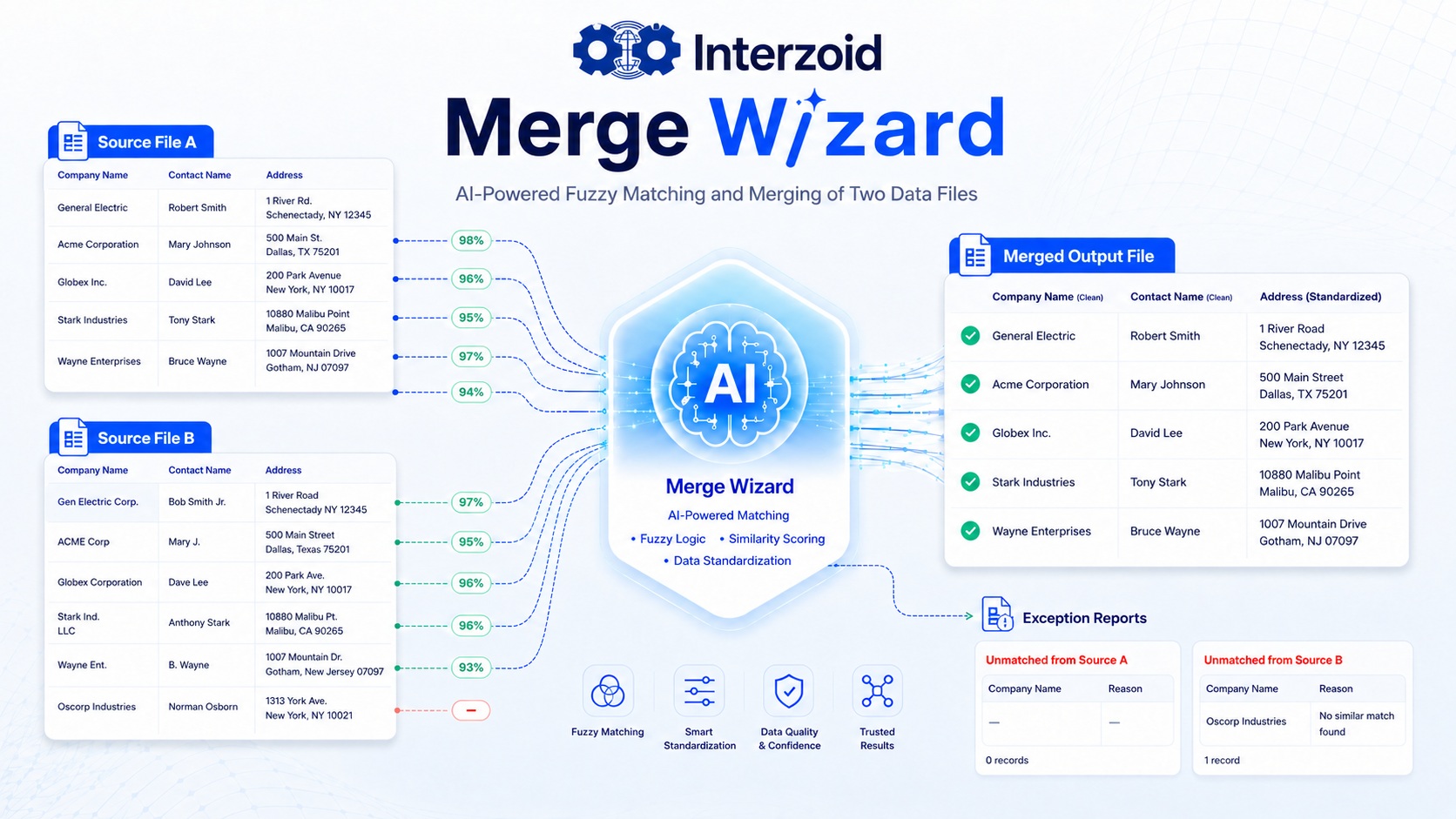
The hard part is that the connecting values are rarely consistent. One file says General Electric, the other says Gen Electric Corp or GENERAL ELECTRIC COMPANY. One list has Robert Smith, the other has Bob Smith Jr. Addresses differ in abbreviations, punctuation, unit numbers, and formatting. A traditional exact-key join finds a small and limited number of matches, and the records that matter most quietly fall through the cracks.
The Interzoid Merge Wizard solves this problem end to end. It matches the records of two CSV or TSV files on the columns you choose, using AI-powered fuzzy matching to see through inconsistent data, and produces a single merged output file with exactly the columns you want from each source, plus exception reports of everything that did not match.
Launch the Merge Wizard | Get an API Key | Understanding Data Matching
Why Merging Across Files Is Harder Than It Looks
Nearly every organization runs on data that lives in more than one place. CRM exports, marketing platforms, finance systems, procurement tools, partner-supplied lists, and acquired datasets each describe the same real-world companies, people, and locations in their own way.
When the values used to join these files do not agree character for character, spreadsheet lookups and database joins fail silently. The result is familiar: campaign lists that cannot be tied to revenue, vendor files that cannot be reconciled against a master list, customer datasets that cannot be consolidated, and hours of manual eyeballing to stitch records together by hand.
The Merge Wizard is built for exactly this situation. Instead of requiring both files to already agree, it uses Interzoid's AI-powered similarity keys to recognize when differently written values represent the same company, person, or address, and joins the records anyway. Records that genuinely have no counterpart are reported separately, so nothing disappears silently.
How the Merge Wizard Works
The Merge Wizard runs entirely in the browser as a guided, no-code workflow. You select a primary file and a file to match, define how their records should match, choose the output, and download the merged result.
Select Two Files
Choose a primary file and a file to match. Both can be CSV or TSV, with or without header rows.
Define Match Criteria
Pair columns across the files and choose AI fuzzy matching or exact matching for each pairing.
Choose Your Output
Pick exactly which columns from each file appear in the merged result and which records to include.
Run and Download
Review match statistics, then download the merged file plus unmatched exception reports for both files.
Every merged record combines the columns you selected from both sources. Along with the merged file, the wizard produces two exception reports: primary file records that found no match, and file-to-match records that were never claimed. That means every record is accounted for, whether it merged or not.
Matching Inconsistent Data Across Files
At the heart of the Merge Wizard is Interzoid's AI-powered similarity key technology. Rather than comparing text character by character, the matching engine generates a similarity key for each value that captures what the value represents. Values written differently but referring to the same real-world entity receive the same key, and their records match.
This lets the merge succeed even when the joining columns are full of variations, misspellings, nicknames, acronyms, abbreviations, and text noise. Three fuzzy similarity types are available, each one also offered as an individual Interzoid API:
Company Name Matching
Join records across files by organization name despite abbreviations, acronyms, legal suffixes, spelling differences, and formatting inconsistencies.
Individual Name Matching
Join records by personal name across contact lists, customer records, and registration files, accounting for nicknames, initials, ordering, and variations.
Street Address Matching
Join records by street address despite abbreviations, punctuation, unit number formats, and differences in address structure.
Exact matching is also available for columns that should agree literally, with automatic whitespace trimming and optional case-insensitive comparison. Many merges use both together.
Multiple Match Combinations for Higher Precision
Real-world merging often needs more than one point of agreement. Two companies named similarly might be different branches; two people with the same name might be different customers. The Merge Wizard lets you stack multiple match criteria in a single merge, and records join only when every criterion matches.
- Fuzzy company name + exact postal code: connect organizations while keeping locations distinct.
- Fuzzy individual name + fuzzy address: link people and households across inconsistent lists.
- Fuzzy company name + fuzzy contact name: reconcile account-and-contact relationships across CRM exports.
- Fuzzy address + exact city or region: match locations with confidence across operational files.
Because criteria combine with AND semantics, each additional criterion makes the match stricter and more precise. This gives you direct control over the precision of the merge: broad single-column fuzzy joins when recall matters most, and multi-column combinations when correctness matters most.
The wizard also gives you control over the shape of the output: keep every primary record with matched data appended (recommended), keep only matched pairs, or keep everything from both files. A first-match-only option ensures one appended record per primary record when a lookup-style result is desired.
Use Cases Where Matching and Merging Delivers Real Impact
Any process that depends on connecting two datasets benefits when the connection no longer requires the data to be perfectly consistent first.
| Use Case | How Fuzzy Matching and Merging Helps |
|---|---|
| Master Data Management | Reconcile department, regional, and system-level files against a golden record source. Match inconsistently written companies, people, and locations to the master, merge in authoritative attributes, and use the unmatched reports to find records missing from the master entirely. |
| Marketing ROI | Join campaign response lists, event attendee files, and lead exports to closed revenue in the CRM or finance system, even when company and contact names were typed differently in each system. Attribution improves immediately because matches that exact joins missed are recovered. |
| Mergers and Acquisitions | Merge an acquired company's customer, vendor, or account files into existing systems, identifying overlap and net-new records despite entirely different data entry conventions. |
| Vendor and Supplier Reconciliation | Match procurement exports, invoices, and onboarding lists against the approved supplier master to catch duplicates, maverick spend, and inconsistently named vendors. |
| Customer 360 and Data Consolidation | Combine customer records across business units, product lines, and legacy applications into unified views, appending attributes from each source file to a single consolidated record. |
| Sales Territory and Account Planning | Merge third-party firmographic lists and prospect files into account data to enrich planning, dedupe territories, and identify whitespace, without manual company-by-company lookup. |
| Analytics and AI Readiness | Produce joined, analysis-ready datasets from sources that could not previously be connected, improving trust in dashboards and giving AI workflows a more complete, linked data foundation. |
In each case, the unmatched exception reports are as valuable as the merged file itself: they quantify the gap between the two datasets and provide a concrete worklist for remediation.
No Code Required, Enterprise Matching Included
The Merge Wizard requires no software installation and no programming. Files are selected in the browser, validated for proper CSV/TSV structure before processing, and matched using the same Interzoid similarity key engine that powers the company's API products.
This makes it practical for business users, analysts, marketing operations, data stewards, and data teams to produce merged datasets in minutes, and to evaluate match quality on real files before deciding whether to operationalize the workflow programmatically with Interzoid's APIs.
Launch the Interzoid Merge Wizard
Getting Started
A first merge takes only a few minutes.
- Register for an Interzoid API key if you do not already have one; trial credits are included.
- Open the Merge Wizard and select your primary file and the file to match.
- Define one or more match criteria, combining AI fuzzy matching with exact matching where appropriate.
- Choose your output columns and options, run the merge, and download the merged file and exception reports.
- Read Understanding Data Matching to go deeper on similarity keys and matching strategy.
The most useful datasets are usually the ones no single system contains: the campaign list joined to revenue, the acquired accounts joined to the CRM, the supplier file joined to the master. Inconsistent data has kept those joins expensive, manual, and incomplete.
The Interzoid Merge Wizard removes that barrier. With AI-powered fuzzy matching across companies, individual names, and addresses, multiple match combinations for precision, and complete exception reporting, it turns two inconsistent files into one merged, trustworthy dataset in minutes.