Data Profiler: Instant, Zero-Configuration Analysis of Any CSV or TSV File
Every data project begins with the same unglamorous question: what is actually in this file? Before anyone can match it, standardize it, enrich it, load it, or hand it to an AI model, somebody has to open it and find out how many records it holds, what each column really contains, how much of it is missing, and where the surprises are hiding.
That discovery work usually happens by hand. Someone scrolls through a spreadsheet, sorts a few columns, writes a quick script, eyeballs a thousand rows, and forms an impression. It is slow, it is inconsistent from person to person, and it reliably misses the problems that matter most: the ZIP code column that silently lost its leading zeros, the status column with four spellings of the same value, the identifier column that is not actually unique.
The Interzoid Data Profiler replaces that guesswork with a complete, automatic analysis. Upload a CSV or TSV file and, in seconds, get its structure, the inferred data type of every column with a match percentage, full statistics, completeness measurements, duplicate detection, candidate key identification, and a ranked list of quality findings. There is nothing to configure and no rules to write.
You Cannot Fix What You Have Not Measured
Poor data quality is expensive precisely because it is invisible until something downstream breaks. A dashboard reports the wrong total, a mailing goes to the wrong addresses, a migration fails at record 400,000, or a model trains on a column that turned out to be 40 percent empty. We have written before about the hidden cost of poor data quality and about the critical role of high-quality data in AI success. In nearly every one of those scenarios, the underlying problem was knowable in advance. Nobody looked, because looking properly was too much work.
Profiling is the step that makes the problem visible while it is still cheap to address. It answers the questions that determine everything that follows:
- Structure: how many records and columns, and do all records actually have the same shape?
- Content: what does each column really hold, regardless of what its name suggests?
- Completeness: how much is missing, and is it concentrated in specific columns or spread across every record?
- Consistency: are values written the same way throughout, or are there formats, cases, and placeholder conventions competing with each other?
- Uniqueness: are there exact duplicate records, and does any column qualify as a reliable key?
A file that answers those five questions cleanly is ready for matching, standardization, enrichment, or loading. A file that does not is going to cause problems later, and it is far better to learn that in the first minute than after the pipeline has run.
How the Data Profiler Works
The Data Profiler runs in the browser as a short, guided workflow. There is no software to install, no connection string to configure, and no analysis to specify.
Choose a File
Select a CSV or TSV file of up to 10,000 records. It is validated in your browser before anything is sent.
Confirm the Basics
Confirm the delimiter and whether the first row holds column names, then review the record preview.
Run the Profile
Every column and every record is analyzed in seconds. Nothing else needs to be specified.
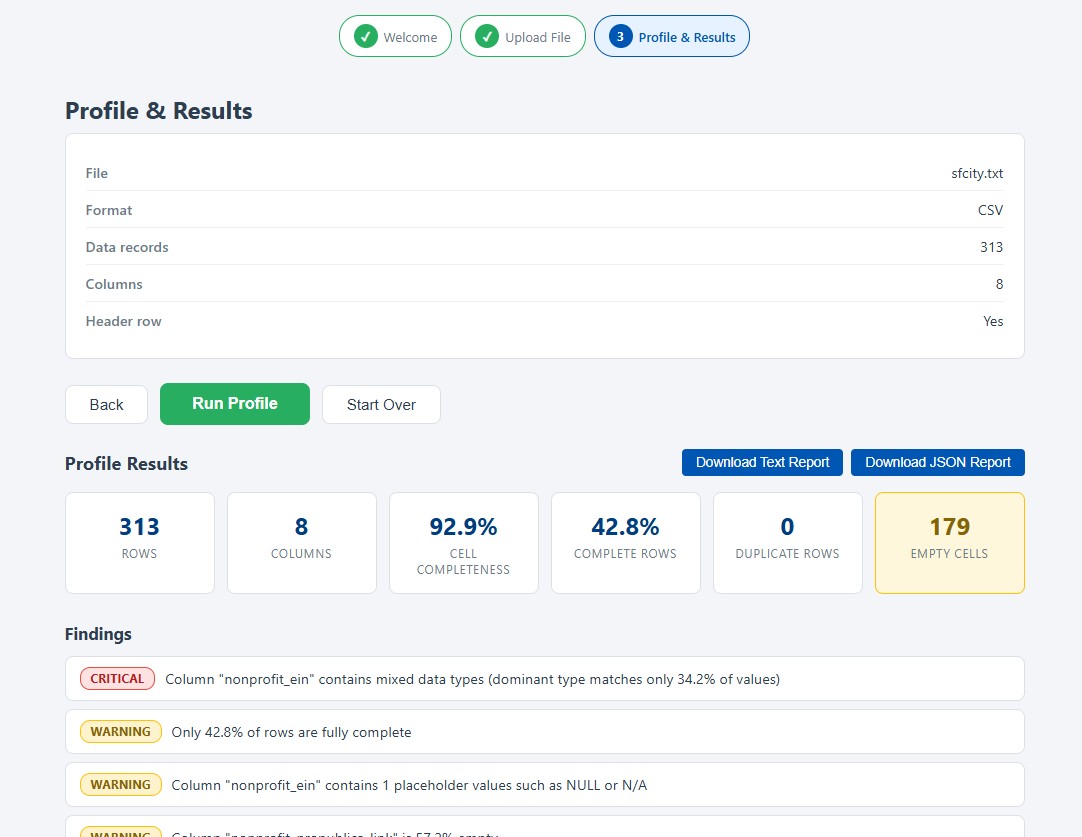
Read and Download
Review the results on screen, then download the full report as text or as JSON.
Validation happens entirely in your browser before the file is transmitted, using the same delimited-file checks used across Interzoid's wizard applications. Binary files, empty files, unclosed quoted values, and records with inconsistent column counts are all caught and explained immediately, with the offending record number identified. A malformed file never reaches the profiling engine.
Profiling itself is completely read-only. Your original file is never modified, and no cleansed or corrected version is produced. The profiler reports; you decide what to do about it.
What the Data Profiler Analyzes
The analysis covers four areas, applied automatically to every column of every file.
Data Type Inference
Each column is classified as integer, decimal, currency, percentage, date, date and time, time, boolean, email, URL, IP address, UUID, identifier, category, text, or mixed, with the percentage of values that match the detected type.
Statistics
Minimum, maximum, sum, mean, median, quartiles, standard deviation, zero and negative counts, and statistical outliers for numeric columns. Length distributions for text. Earliest and latest values and competing formats for dates.
Completeness and Consistency
Cell-level completeness, fully complete record percentage, per-column empty counts, placeholder values such as NULL and N/A, leading and trailing spaces, and values that differ only by capitalization or spacing.
Duplicates and Keys
Exact duplicate records, duplicate column names in the header, distinct value counts, uniqueness percentages, constant and near-constant columns, and candidate primary key detection.
Type inference deserves particular attention, because it is where naive profiling tools cause damage. A
column of values like 00501 and 02134 is not a set of integers, and treating it as
one destroys the leading zeros that make the values correct. The profiler recognizes identifier-style
columns from a combination of evidence, including leading zeros, uniform length, uniqueness, and column
naming, and reports them as identifiers that belong in text storage. Similarly, a column mixing
1250.00 with $1,250.00 is reported as a numeric column with a currency formatting
warning, rather than being written off as unusable mixed content.
Findings, Ranked by Severity
Statistics tell you what is in the file. Findings tell you what to look at first. Every observation is ranked so that a genuine structural problem is never buried among routine notes.
| Severity | Examples of What Gets Reported |
|---|---|
| Critical | Duplicate column names in the header row, columns containing genuinely mixed data types, and identifier columns that contain duplicate values despite appearing to be unique keys. |
| Warning | Exact duplicate records, low complete-record percentages, values that do not conform to the column's detected type, mostly empty columns, multiple competing date formats, statistical outliers, leading and trailing whitespace, capitalization variants of the same value, and placeholder values standing in for missing data. |
| Info | Constant and near-constant columns, candidate primary keys, leading zeros that require text storage, and columns that behave as categories with a small set of repeating values. |
Findings that involve specific values include real examples drawn from the file, with the record numbers where they occur. When a column is inferred as a date but eight values do not parse, the profiler shows you which eight values and which records they are in, so the investigation starts with evidence instead of a search.
The case-variant finding is a good illustration of why this matters. A status column holding
Active, ACTIVE, active, and Active with a trailing
space looks like four different values to every group-by, join, and filter that touches it, while looking
like one value to a human reading the file. That is the same class of problem we explored in
One Hundred Ways to Say IBM,
scaled down to a single column, and profiling surfaces it in seconds.
Results You Can Read, Share, and Automate
Results appear on screen as a dataset summary, a ranked findings list, and an expandable profile for each column. The same content is also rendered as a plain text report on the page, which can be copied into a ticket, an email, or a data dictionary without reformatting.
INTERZOID DATA PROFILER
=======================

  File:                     customers.csv (CSV)
  Rows:                     8,412
  Columns:                  12
  Cell Completeness:        94.3%
  Duplicate Rows:           37

FINDINGS
--------
  [CRITICAL] Column "customer_id" resembles an identifier but contains 6 duplicate values
  [WARNING] 37 exact duplicate rows found (0.4% of the file)
  [WARNING] Column "signup_date" uses 3 different date formats
  [WARNING] Column "status" has 4 value groups differing only by capitalization or spacing
  [INFO] Column "postal_code" contains leading zeros and should be stored as text, not numbers
Both a text report and a full JSON report are available for download. The JSON version contains the complete profile, including every statistic and every finding as a structured code with parameters, which makes it straightforward to store profiles over time, compare a file against last month's version of itself, or feed the results into a data catalog or quality dashboard.
The interface and the entire report, including every finding message, are available in 17 languages. A
language can be selected from the header menu or passed directly in the URL, which makes it easy to share
a link with colleagues in another region:
data-profiler.interzoid.com/?lang=de.
Zero Configuration by Design
Most data quality tooling asks you to describe your expectations first. You define rules, write assertions, declare a schema, or configure thresholds, and only then does the tool tell you where reality disagrees. That model is powerful for monitoring a dataset you already understand, and useless for the situation people are actually in most often: a file just arrived, and nobody knows anything about it yet.
The Data Profiler inverts that. It makes no assumptions about what your data should look like, and it requires no input beyond the file itself. Every threshold used to rank findings is an internal default chosen to be useful across ordinary business data. You get the complete picture first, and can then decide what deserves a rule.
The analysis is also purely algorithmic and deterministic. The same file always produces the same profile. Interzoid's AI-powered similarity key technology, described in Simplifying Entity Resolution with Data Matching APIs, is what powers the matching and enrichment products; profiling is the measurement step that comes before them. Profiling tells you what your data is. Matching, standardization, and enrichment change what it is.
Where Profiling Pays Off
Any workflow that begins with an unfamiliar file benefits from starting with a profile.
| Scenario | What Profiling Delivers |
|---|---|
| Data Onboarding and Vendor Files | Assess a partner, vendor, or acquired file the moment it arrives. Confirm record counts, spot missing columns and empty fields, and identify structural problems before anyone commits to an integration timeline. |
| Preparing Files for Matching | Check that the columns you plan to match on are populated, consistently formatted, and free of placeholder values, so a matching run produces meaningful results the first time. |
| Migration and Loading | Find the leading zeros, mixed types, oversized values, and non-conforming records that cause loads to fail or corrupt data silently, while the file is still on your desk. |
| Analytics and Reporting | Quantify completeness and duplication before numbers reach a dashboard, so a total can be trusted or its limitations stated honestly. |
| AI and Model Readiness | Establish which columns are complete, consistent, and meaningful enough to use as features or context, and which need remediation first. |
| Master Data Management | Evaluate source files against the standards expected of a golden record, and identify candidate keys and uniqueness problems before consolidation begins. |
| Data Documentation | Generate an accurate, current description of a dataset in seconds, including types, ranges, and distributions, for data dictionaries and catalog entries. |
From Profiling to Fixing
A profile is the beginning of the work, not the end. Once you know what is wrong, the rest of the Interzoid platform is built to address it:
- Inconsistent company, individual name, or address values within a file are resolved with the Match Wizard and the underlying matching APIs.
- Two files that need to be connected despite inconsistent join values are combined with the Merge Wizard.
- Company names written many different ways are normalized to official forms with organization name standardization.
- Sparse or thin datasets are filled out with the Data Enrichment Wizard.
- The broader path from raw files to trustworthy inputs is described in Turn Enterprise Data Into AI-Ready Data.
Every one of those tools works better when you already know what the file contains. Profiling first means choosing the right remedy instead of guessing at one, and it gives you a before-and-after measurement of whether the remedy worked.
Launch the Data Profiler
Frequently Asked Questions
Does the Data Profiler change my data?
No. Profiling is entirely read-only. The file is analyzed and the results are returned to your browser. Your original file is never modified, and no corrected or cleansed version is produced.
Do I need to define rules, expectations, or a schema first?
No. The Data Profiler is zero configuration. You upload a file and get a complete profile. There is nothing to define, no expectations to write, and no schema to supply. Every threshold used to rank findings is an internal default.
Does the Data Profiler use AI?
No. Profiling is purely algorithmic and deterministic, so the same file always produces the same profile. Interzoid's AI-powered similarity key technology is used in the matching and enrichment products, not in the profiler. Profiling tells you what your data is; matching and standardization then fix what is wrong.
What file types and sizes are supported?
CSV and TSV files of up to 10,000 data records, with or without a header row. The file is validated for proper delimited structure in your browser before it is sent, so malformed files are caught immediately.
What does the Data Profiler cost?
It is free. An Interzoid API key is required to use it, but profile runs do not consume API credits. Each key can run five profiles per day, and the limit resets at midnight Pacific time.
Is the Data Profiler available in other languages?
Yes. The interface and the entire report, including every finding message, are available in 17
languages. Choose a language from the header menu or pass a language parameter in the URL, for example
?lang=de or ?lang=ja.
Getting Started
A first profile takes only a few minutes.
- Register for an Interzoid API key if you do not already have one; trial credits are included, and profiling does not consume them.
- Open the Data Profiler, enter your API key, and choose a CSV or TSV file.
- Confirm the file format and whether the first row is a header, then review the preview of the first records.
- Run the profile and review the summary, the findings ranked by severity, and the per-column profiles.
- Download the text or JSON report, and read the Data Profiler documentation for a full reference of types, statistics, and findings.
The most costly data problems are rarely the ones anyone chose to ignore. They are the ones nobody saw: the column that was 40 percent empty, the key that was not unique, the four spellings of the same status, the ZIP codes that lost their leading zeros somewhere between one system and the next.
The Interzoid Data Profiler makes that first look complete, immediate, and free. Upload a file, get its full profile in seconds, and start every data project knowing exactly what you are working with.
Launch the Data Profiler | Get a Free API Key | Read the Documentation | Interzoid Central Command