MySQL Data Matching: Find Duplicate and Similar Records Without Exporting a File
Ask anyone who maintains a customer table whether it contains duplicates and you will get the same answer:
almost certainly, but nobody knows how many. The obvious ones were cleaned up years ago. What remains are
the records that are obviously the same to a person and completely different to a database: the account
entered as Acme Corp. in one system and ACME Corporation in another, the customer
who exists twice because someone typed Jim Whitfield the second time instead of
James Whitfield, the shipping address that appears three times with three abbreviations of
the same street.
SQL is excellent at finding exact duplicates and helpless against these. GROUP BY company_name
treats every one of those variations as a distinct company. The usual workaround is to export the table,
run it through a matching tool, and load the results back, which introduces a copy of your production data
that has to be secured, tracked, and deleted, and which is out of date the moment it is written.
The Interzoid MySQL Data Matching Wizard removes that round trip. It connects directly to your MySQL database, reads the columns you choose, and returns clusters of records that refer to the same real-world entity, grouped by an AI-generated similarity key. No export, no staging table, no copy to clean up afterward.
Why Exact Matching Is Not Enough
Duplicate records are rarely duplicates in the literal sense. They accumulate through mergers, form submissions, imported vendor lists, manual entry, and integrations between systems that each had their own conventions. By the time they land in one table, the same entity may be represented a dozen different ways, none of them wrong, none of them identical. We catalogued how far this can go in One Hundred Ways to Say IBM.
The cost is not aesthetic. It shows up as inflated customer counts, revenue split across records that should have been one account, the same household receiving four copies of a mailing, sales teams calling contacts a colleague already spoke to, and reports that quietly disagree with each other. We have written about the wider financial impact in the hidden cost of poor data quality, and about why it matters even more once that data feeds a model in the critical role of high-quality data in AI success.
Interzoid's approach is described in detail in Simplifying Entity Resolution with Data Matching APIs. Rather than comparing strings, each value is converted into a similarity key that represents the entity behind the text. Values that refer to the same company, person, or place produce the same key regardless of spelling, abbreviation, punctuation, or word order. Grouping by that key turns an intractable comparison problem into an ordinary one.
How the MySQL Matching Wizard Works
The wizard runs in the browser as a guided, five-step workflow. There is nothing to install and no connector to deploy inside your environment.
Choose a Function
Pick from six matching functions covering company names, individual names, addresses, and combinations.
Connect
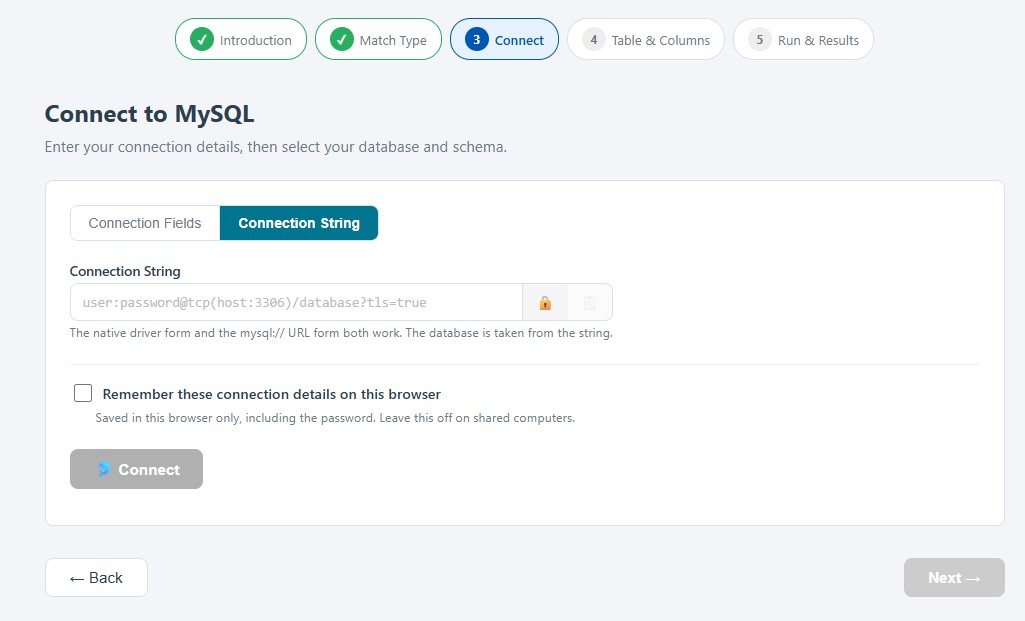
Enter connection fields or paste a connection string, then pick your database from a dropdown.
Select Columns
Choose the table, assign the match columns, and check the columns to include in the report.
Run
Records are processed concurrently and grouped into clusters by similarity key.
Download
Review the clusters on screen and save the report as a CSV file for review or remediation.
Each step is populated from your live database. After connecting, the wizard queries MySQL for the databases you can access, then the tables and views in the one you pick, then the columns of the table you select. You never type an object name or look one up in another window, and you cannot select something that is not actually there. MySQL has no separate schema level, since a schema and a database are the same object there, which makes this the shortest connection flow of any of the wizards.
The wizard reads only. It issues SELECT statements against the columns you choose and nothing else. No table is written, no schema object is created, and your database is left exactly as it was found.
Six Ways to Match
Different data calls for different matching. The wizard offers three single-column functions and three combinations that raise precision by requiring agreement on two fields at once.
Company Names
Resolves IBM, I.B.M. Corp, and
International Business Machines to a single entity, along with the legal suffixes,
punctuation, and abbreviations that make company names so variable.
Individual Names
Handles nicknames, initials, and ordering, so James Johnston,
Jim Johnston, and J. Johnston group together instead of counting as
three customers.
Street Addresses
Reconciles directional abbreviations, street type variations, and spacing, matching
400 E Broadway St with 400 East Broadway Street.
Combinations
Company with address, company with individual name, or address with individual name, for cases where one field alone produces matches that are too broad to act on.
Combination functions matter more than they might appear. A large organization may have hundreds of locations sharing one company name, and matching on the name alone collapses them into a single cluster. Requiring the address to agree as well separates the branch in Dallas from the branch in Phoenix while still recognizing that both spell the parent company four different ways.
Connecting to MySQL
The wizard accepts connection details in either of two forms, chosen with a toggle at the top of the connection step.
- Connection fields: host, port, username, password, and SSL mode entered individually.
- Connection string: a complete MySQL connection string in either the native driver form,
user:password@tcp(host:3306)/database?tls=true, or the URL form,mysql://user:password@host:3306/database. The database is taken from the string, so the wizard skips the database dropdown entirely.
Because a connection string is exactly what managed MySQL providers hand you, the second option usually means pasting one value and connecting. That covers Amazon RDS and Aurora MySQL, Azure Database for MySQL, Google Cloud SQL, PlanetScale, and any self-managed server reachable over the network. MariaDB speaks the same wire protocol and connects through the same driver, so MariaDB servers work without any change.
TLS is configurable through the SSL mode setting, which defaults to require so that
cloud-hosted databases are encrypted without any extra step. Certificate validation is available through
verify-ca and verify-full, and disable is there for a local server
that has no TLS configured. The wizards share one vocabulary for this setting, so the same four values mean
the same thing whichever database you are connecting to, and they are translated to the MySQL driver's own
TLS parameter for you.
Connect With a Read-Only User
Since the wizard only reads, the cleanest way to use it is with an account that can only read. A dedicated user takes a moment to create and gives you exact control over what is visible:
CREATE USER 'interzoid_reader'@'%' IDENTIFIED BY 'strong-password-here';
GRANT SELECT ON mydb.* TO 'interzoid_reader'@'%';
FLUSH PRIVILEGES;
Granting SELECT on a single database also limits what the wizard can see, since the database
dropdown lists only databases the account has privileges on. Replacing '%' with a specific
host narrows where the account may connect from, and access can be revoked at any time by dropping the
user. Credentials are transmitted over HTTPS with each
request and are not retained by Interzoid after the session ends. They are saved in your own browser only
if you switch on the optional Remember these connection details toggle, which is off by
default and erases what it stored when switched back off.
Reading the Results
Results arrive as clusters. Every record that shares a similarity key with at least one other record is shown, grouped together, with a blank line between clusters. The last column of each row is the key itself, which makes the grouping auditable rather than something you have to take on faith.
company,address,city,state,simkey

IBM Corporation,1 New Orchard Rd,Armonk,NY,d477E1d7sG6dja3hDNsk9P
I.B.M. Corp,1 New Orchard Road,Armonk,NY,d477E1d7sG6dja3hDNsk9P

Microsoft Inc.,1 Microsoft Way,Redmond,WA,k8Rp2mNx4wQjL9vB3cYh7T
Microsoft Corporation,One Microsoft Way,Redmond,WA,k8Rp2mNx4wQjL9vB3cYh7T
MSFT Corp,1 Microsoft Way,Redmond,WA,k8Rp2mNx4wQjL9vB3cYh7T
You choose which columns appear alongside the matched values, so the report can carry the primary keys, account numbers, or region codes your team needs to act on it. Two options control the shape of the output: similarity keys can be suppressed for a cleaner file, and the matches-only filter can be turned off to return every record with its key, which is the form you want when loading results back into a table for further analysis.
The report downloads as a CSV file with no headers or metadata beyond what you asked for, which makes it equally suitable for opening in a spreadsheet, attaching to a ticket, or feeding into a script. A single job can process up to 500,000 records, and each record consumes one API credit.
The interface is available in 17 languages, selectable from the header menu or through a URL parameter
such as postgres-match.interzoid.com/?lang=de.
Where MySQL Matching Pays Off
| Scenario | What Matching Delivers |
|---|---|
| Customer and Account Deduplication | Find the accounts that represent one customer under several spellings, so revenue, activity, and support history can be consolidated against a single record. |
| CRM and Marketing Hygiene | Collapse duplicate contacts before a campaign, so the same person is not emailed three times and engagement metrics reflect people rather than rows. |
| Post-Merger Consolidation | Identify the overlap between two customer or vendor lists loaded into one database, before deciding which records survive consolidation. |
| Vendor and Supplier Rationalization | Reveal how many supplier records refer to the same organization, which is usually the first step in negotiating as one buyer instead of several. |
| Compliance and Risk | Ensure that screening and reporting operate on entities rather than on individual rows, so a match against one spelling is not missed against another. |
| Migration and Modernization | Quantify duplication in a source database before it is carried into a new system, where it becomes considerably more expensive to remove. |
| AI and Analytics Readiness | Give models and dashboards a deduplicated view, so counts, aggregates, and training sets are not distorted by the same entity appearing many times. |
Where Matching Fits in the Workflow
Matching is one step in a sequence, and it works best when the steps around it are in place:
- Before matching, the Data Profiler tells you whether the columns you plan to match on are populated, consistently formatted, and free of placeholder values.
- For files rather than databases, the Match Wizard performs the same matching against CSV and TSV data.
- The same workflow is available for other databases: the Postgres Data Matching Wizard for PostgreSQL and the Snowflake Data Matching Wizard for a Snowflake warehouse.
- Connecting two datasets whose join values disagree is the job of the Merge Wizard.
- Normalizing company names to their official forms is handled by organization name standardization.
- Filling out sparse records is the role of the Data Enrichment Wizard.
- The broader path from raw data to trustworthy inputs is described in Turn Enterprise Data Into AI-Ready Data.
Every one of these is available through the Interzoid API directory, and the complete set of tools can be launched from Interzoid Central Command.
Frequently Asked Questions
Does the MySQL Data Matching Wizard change my database?
No. The wizard only issues SELECT statements against the table and columns you choose. Nothing is written, updated, or deleted, and no schema objects are created. The match report is returned to your browser, and you decide what to do with it.
Do I have to export my data first?
No. The wizard connects directly to your MySQL database and reads the columns you select. There is no CSV export, no staging area, and no copy of your data to manage or delete afterward.
Which MySQL services are supported?
Any MySQL server reachable over the network, including self-managed instances and managed services such as Amazon RDS and Aurora MySQL, Azure Database for MySQL, Google Cloud SQL, and PlanetScale. MariaDB speaks the same wire protocol and connects through the same driver, so MariaDB servers and MariaDB-based services work without any change.
How does the matching find records that are not identical?
Each value is sent to Interzoid's AI-powered similarity key algorithms, which generate a key representing the underlying entity rather than the literal characters. Two records whose values refer to the same company, person, or address receive the same key, even when the text differs in spelling, abbreviation, punctuation, or word order.
Are my database credentials stored?
Your credentials are transmitted over HTTPS with each connection and discovery request and are not retained by Interzoid after the session ends. They are saved in your own browser only if you switch on the optional Remember these connection details toggle, which is off by default.
What does MySQL data matching cost?
Each record processed consumes one Interzoid API credit, and a single job can process up to 500,000 records. Trial credits are included with a new API account, so a first table can be matched at no cost.
Is the wizard available in other languages?
Yes. The interface is available in 17 languages. Choose a language from the header menu or pass a
language parameter in the URL, for example ?lang=de or ?lang=ja.
Getting Started
A first match takes about ten minutes, most of which is deciding which table to start with.
- Register for an Interzoid API key if you do not already have one; trial credits are included.
- Open the MySQL Data Matching Wizard, enter your API key, and choose a matching function.
- Connect with your connection fields or a connection string, then select your database.
- Choose the table, assign the match columns, and check the columns to include in the report.
- Run the match, review the clusters, and download the CSV report. The documentation covers every option in detail.
A good first table is the one people complain about: the customer list, the contact table, the vendor master. The duplicates are already there, and the only question is how many.
Duplicate records do not announce themselves. They sit in production tables looking like ordinary rows, splitting one customer into four, inflating counts, and quietly undermining every number calculated from them. Exact matching cannot find them, and exporting the table to look for them creates a second problem while solving the first.
The MySQL Data Matching Wizard finds them where they live. Connect to your database, choose a table and a column, and see which of your records have been the same thing all along.
Launch the Matching Wizard | Get an API Key | Read the Documentation | Interzoid Central Command